
My OSINT Blog
A place for us to share even MORE OSINT with you!
Posted: 2026-06-17, by Micah Hoffman
Ever run an OSINT tool and have it return an error only to find out that the developer already fixed that issue in a new version that you never downloaded?
We are hoping that this never happens to you and have taken a large stride to ensure it doesn't.
Starting with the most recent version of our bookmarklet HTML file, you get a bookmarklet version checker.
We've made it so that you choose how you install our bookmarklets - go to https://tools.myosint.training/ and get one or get them all. That is not changing.
If you do decide to download our HTML file and import all our bookmarklets into your browser, you have a unique method of checking to ensure you have the latest version installed.
Our HTML bookmarklet file has an extra bookmark in it that shows the date and time it was made (see #2 in the image below).
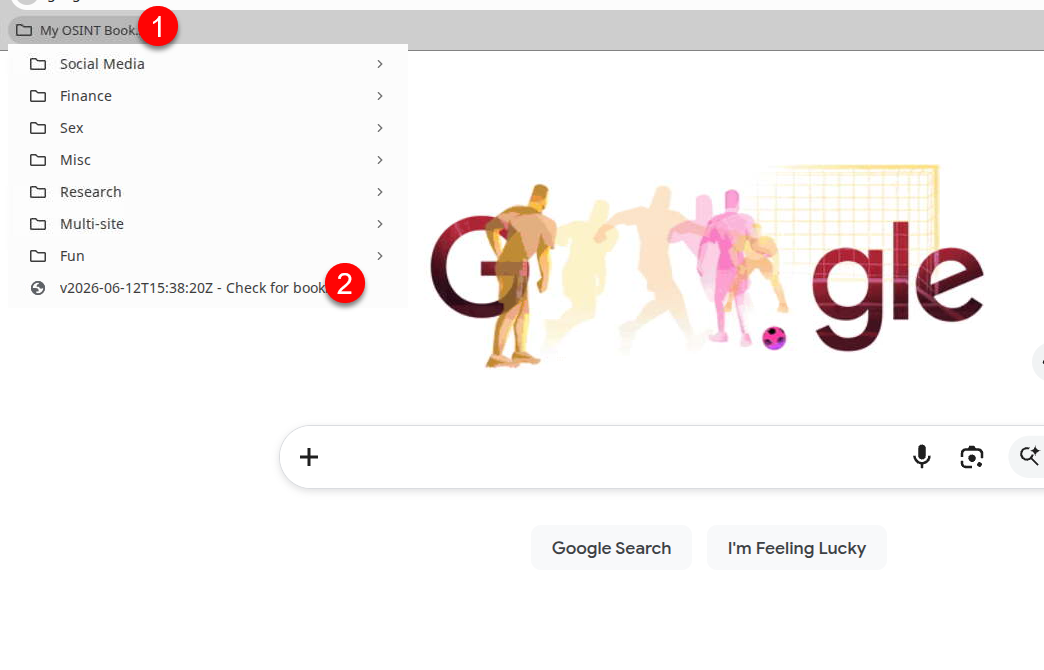
Previously you had to compare that date and time stamp to the version displayed on our https://tools.myosint.training/ page to see if there were updates. Now, with our latest bookmarklet HTML file, you just click that version and it'll check for you.
If your bookmarklets are out of date (a newer version exists on the site), you should see something like the image below:
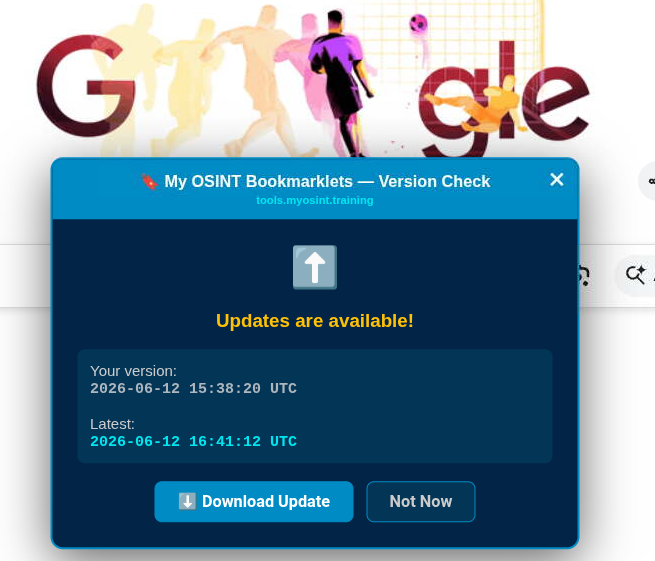
If you click the "Download Update" button, it'll make your browser download the latest HTML file with all our bookmarklets. Then, just import into your browser and remove the older ones.
If your bookmarklets are the same version, well, then you should see something like the following message:
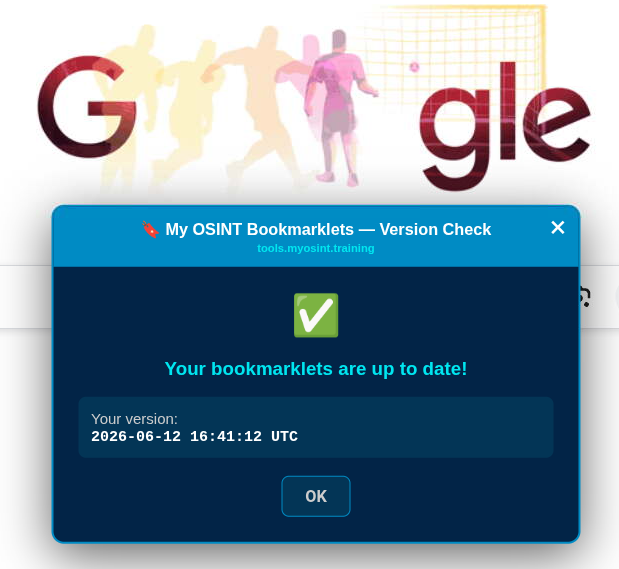
You must be on a webpage for the version checking bookmarklet to run. You cannot launch it from the browser home page.
So, surf to Google or DuckDuckGo or some other page, and click that bookmarklet to stay updated!
Posted: 2026-04-16, by Micah Hoffman
❗Warning: Using this bookmarklet may reveal nude imagery on the website. ❗
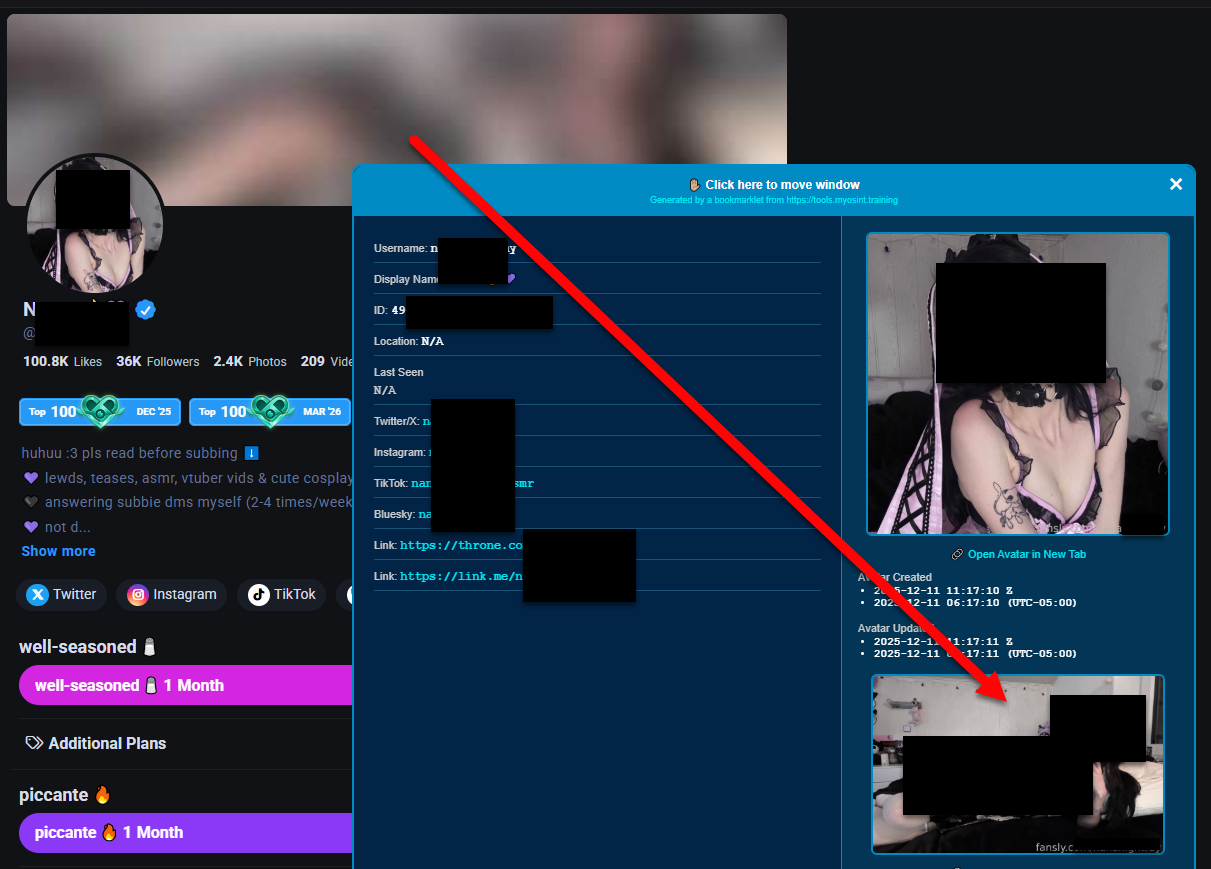
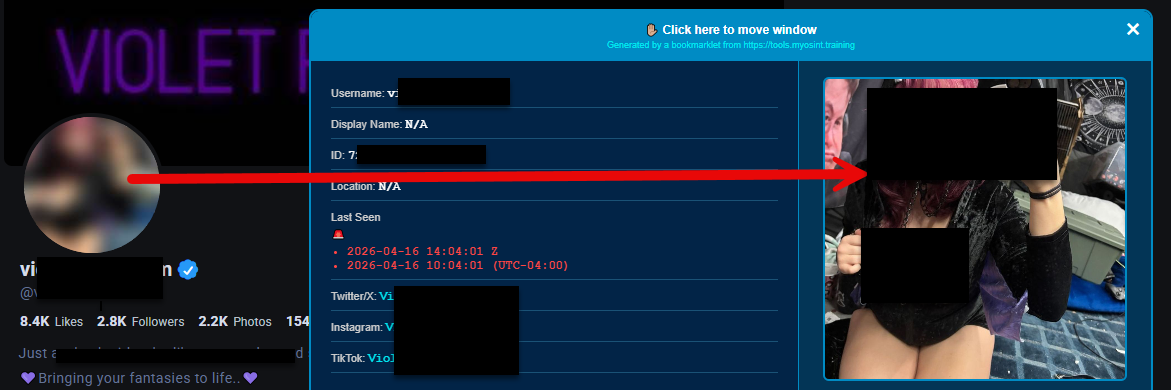
The Fansly.com site user profiles have a wealth of data not shown on screen. This bookmarklet reveals some of that.
Some of the helpful things it does:
Get the bookmarklet here.

And looks like this when you use it:
Posted: 2026-04-15, by Micah Hoffman
❗Warning: Using this bookmarklet may reveal nude imagery on the OnlyFans website. ❗
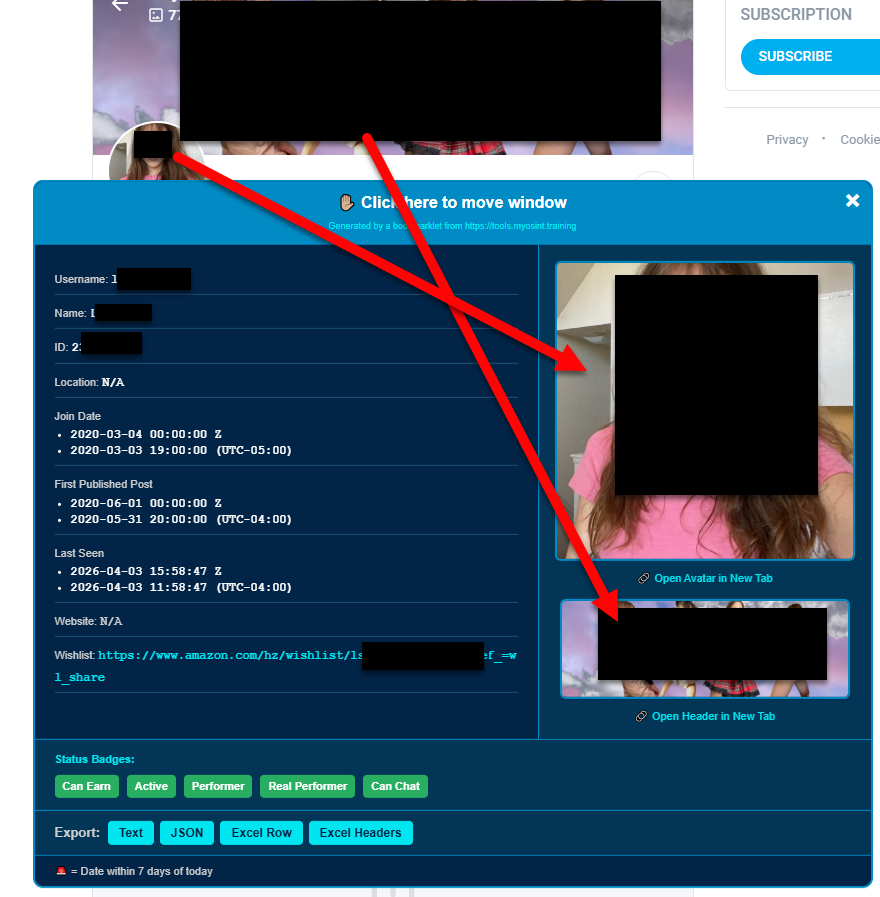
Just created an OnlyFans (OF) user profile bookmarklet that displays a bunch of data hidden in your browser when you visit an OF profile.
Some of the useful data about the profile like the date joined and the last seen dates are displayed in UTC and local time formats.
Get the bookmarklet here.

And looks like this when you use it (forgive the arrows):
Posted: 2026-04-08, by Micah Hoffman
We made a bookmarklet that removed the "blur" class from elements in a web page. It used to work fabulously on thatsthem.com since they sent the extra blurred data to your browser but hid it behind the blur.
As with many things in the OSINT world, things change and thatsthem.com is no longer sending the extra data to our browsers (maybe we helped them be more secure?).
There are MANY other sites that use the blur class in their pages and send the additional data to your browser (looking at you anywho.com).
This bookmarklet has been renamed to the "Deblurring Bookmarklet" and still works on other sites using this same technique.
In 2022, Griffin developed a technique to view historical Bitmoji avatars on the Snapchat platform. Read about it here.
When I heard of this, I had to make a tool (hey...its what I do!). Read about that here.
Unfortunately, while the tool "worked", it was cumbersome and frustrating to use. The Snapchat Bitmoji Historical Avatar Viewer bookmarklet changes all that!

It is very simple to use now.
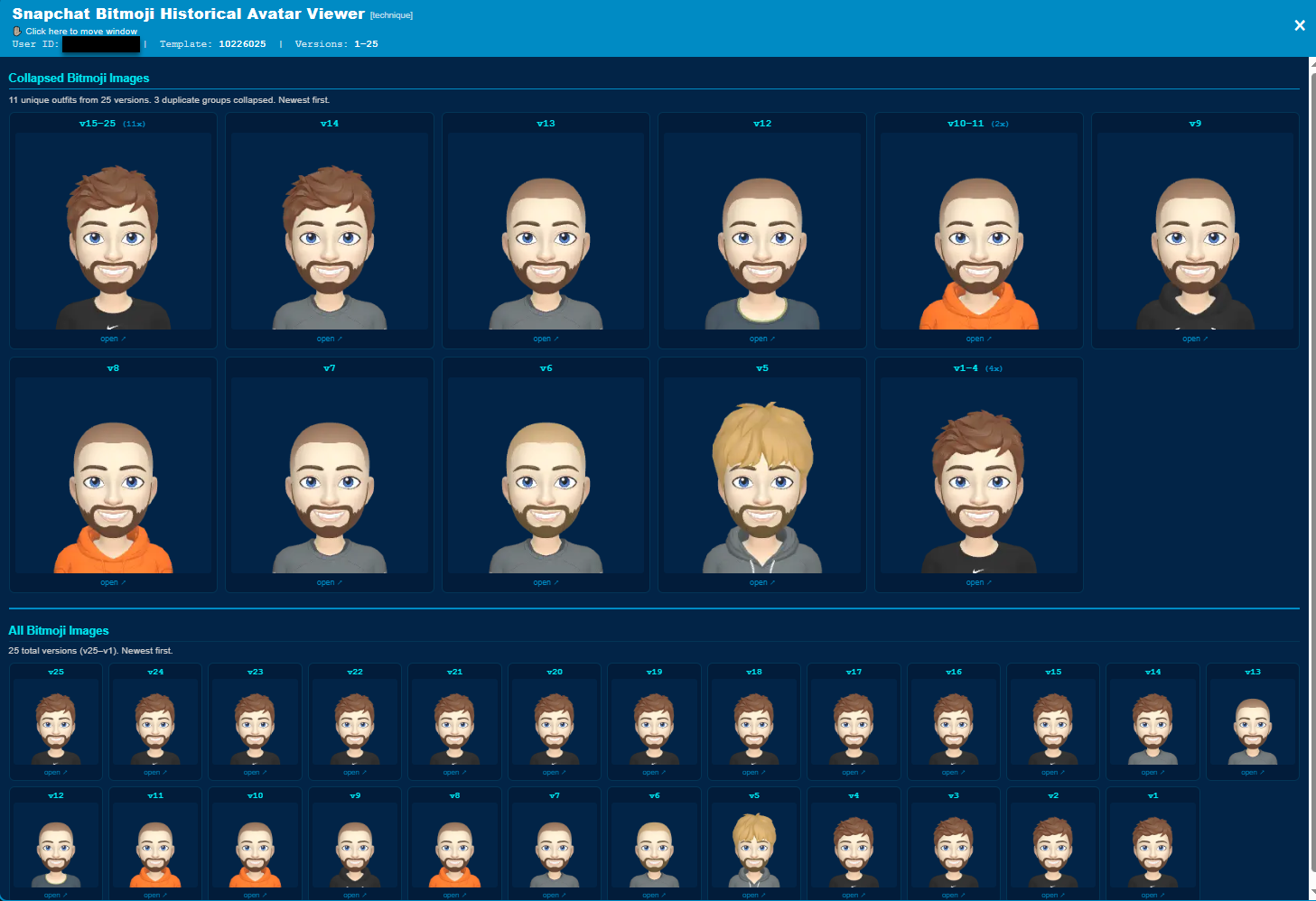
The Bitmojis are just versioned (numbered) and do not have dates associated with them. So that is a bummer.
The tool will also do a quick look at each Bitmoji and try to determine if version X was the same as the previous and the next one. If so, it'll show that above the avatar. In the top of the image above, the first avatar was seen from version 15-25 so it only showed 1 image. Hoping this makes it easier to ocompare changes over time.
Just in case the analysis is incorrect, I've included all the images at the bottom of the modal so you can look at them yourself. (Thanks Lisette for the suggestion!)
Posted: 2026-03-17, by Micah Hoffman
Most of our students know that we really like the browser extension/add-on "Search By Image". But we all know that some OSINT researchers cannot use that extension for one reason or another.
That is where our Image Reverse Lookup bookmarklet, submitted by OSINT community member Zycher, is helpful.
First, note that this bookmarklet is on the "General Bookmarklet" table. You need to click that button to see it (1 in the image below).
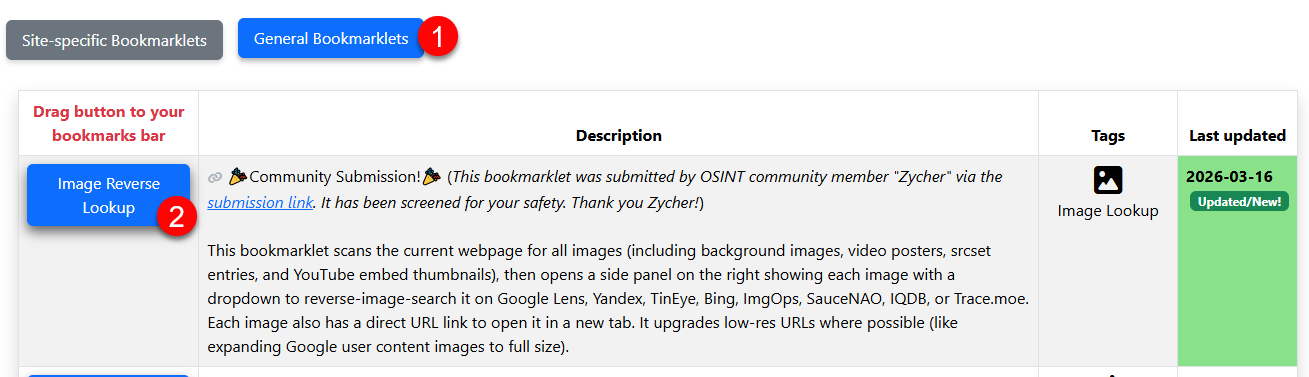
On any web page there are images, you can execute this bookmarklet and it'll extract the images and pop up a side panel which allows you to open the image in a new tab or reverse image search it using several engines.
Here's what it looks like:

At this point, your browser will open a new tab and take you to that image search engine - auto-uploading the image at the same time.
I must have 10 different sizes of screwdrivers in my workshop toolbox. Why have so many? Because I never know when one will break or not work well. Same with this tool.
If you cannot install extensions in your browser or cannot access an image in the web page due to some restriction, this bookmarklet will be very helpful!
Big thank you again to Zycher for submitting it!
Posted: 2026-03-03, by Micah Hoffman
I watched an Indicator.media YouTube video where the guest mentioned that they loved using our bookmarklets but still had to copy and paste single values into their spreadsheet.
Well that sounds like a terrible thing to have to do.
So we are introducing the "Export to Excel" buttons at the bottom of over 20 of our bookmarklets. Each of the new buttons converts the bookmarklet data into a TSV (Tab Separated Value) list. The TSV is super compatible with pasting whole rows of data into Google Sheets or Excel.
There are 2 buttons:
Here is what those buttons look like in the TikTok User ID bookmarklet.
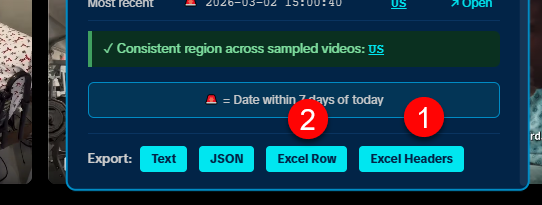
The process is:
Here is what it looks like in the spreadsheet with headers first (1), then data (2), and then a little column clean up (3).
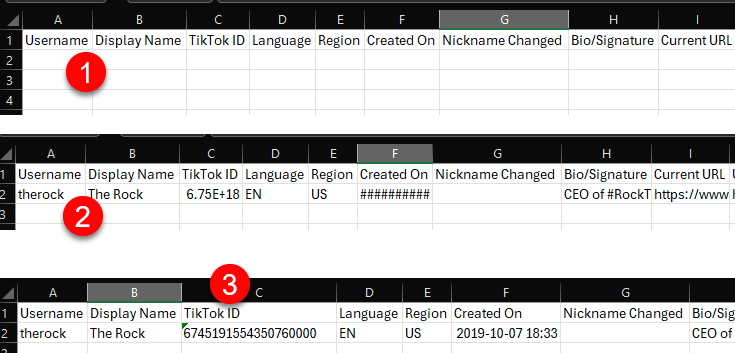
We did this so that if you are building a spreadsheet on multiple profiles you don't get and have to delete the header row every time.
Posted: 2026-03-02, by Micah Hoffman
Two updates for you in this blog post.
The first is that we've added links to each bookmarklet on the page so you can now share a link to that specific bookmarklet instead of telling people to "Go to the page and scroll down until....".
Here is an example of a bookmarklet direct link https://tools.myosint.training/#bm-tiktok-user-id-bookmarklet. And you can copy these by clicking the new, gray link 🔗icon in the description field as shown below.
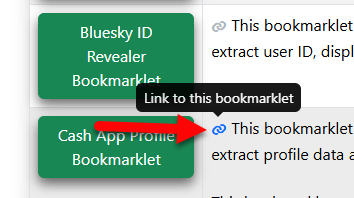
It is no coincidence that the example for the direct link above was for the https://tools.myosint.training/#bm-tiktok-user-id-bookmarklet because it is updated to show the TikTok ID in a link to the profile.
Most of us use the https://tiktok.com/@USERNAME URLs to visit TikTok pages. This is useful when you know the user's username. But users can change those names and, when you try to visit that specific profile, the account might be gone.
Another technique to visit a TikTok user's page that will work even when they change their username is to use the https://tiktok.com/@TIKTOKID URL instead.
For example, the https://www.tiktok.com/@therock profile has a TikTok ID of 6745191554350760966. We can then put that into the URL https://tiktok.com/@6745191554350760966 which will redirect to the current username associated with that ID.
And we've added this URL to our bookmarklet as shown in the image below.
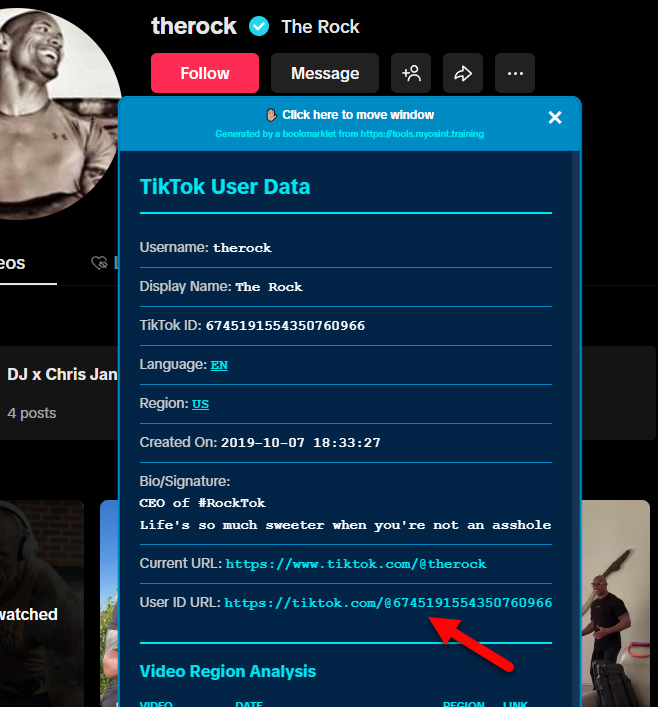
As always, we hope this helps you in your OSINT work!
Posted: 2026-02-19, by Micah Hoffman
An OSINT community member recently sent us an email and asked if we could add the location and language of a TikTok account to our TikTok User ID Bookmarklet.
tl;dr - We did!
When you request a TikTok profile page like https://tiktok.com/@XXXXXXX, there is a mass of JSON inside a script tag with the ID of "__UNIVERSAL_DATA_FOR_REHYDRATION__". This is where we can pull a bunch of user data....but not the region or country for the user.
We had to dive a little deeper into TikTok data and, once we did, we found what we were looking for. See, the region code, a 2-letter country code like "US" or "TH", can be found in the page source for posts the user made. The parameter we look for is "locationCreated".
With this knowledge, we modified our bookmarklet to be more active now. When you use it, it will look at the locationCreated values for the first and last videos the account made and show you the country or region codes.
As an example, take a look at the values we found for the Indonesian user https://www.tiktok.com/@riaricis.
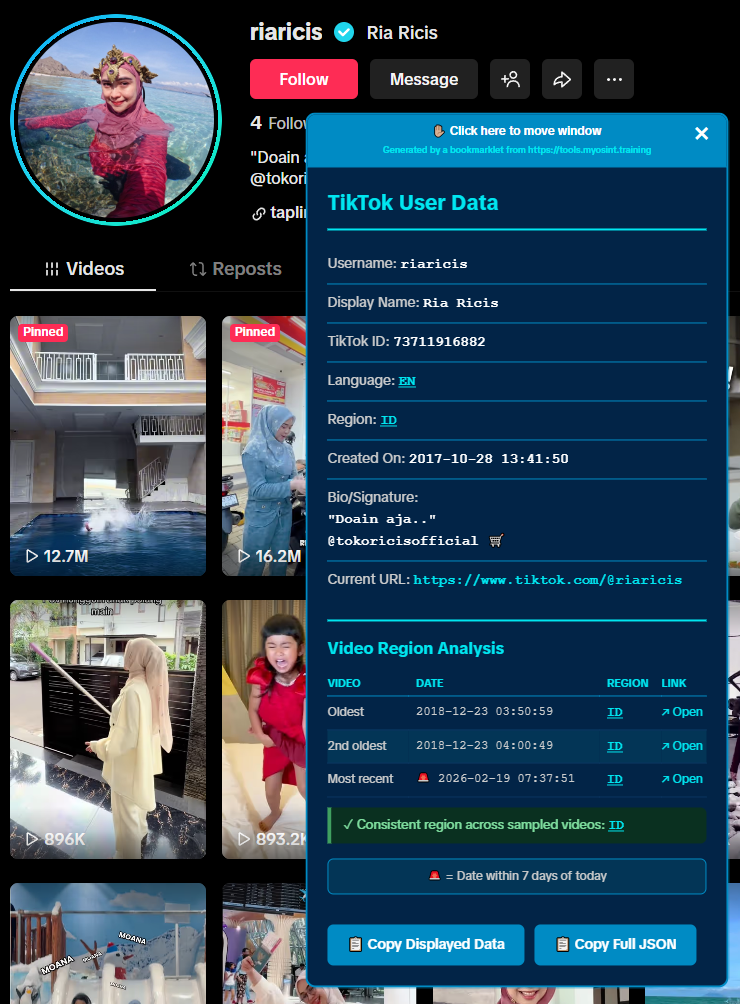
Her videos showed a location of ID. Some of you might be thinking "Great Micah. Now I need to Google what country ID is now." No you do not! Just click the hyperlinked "ID" (or whatever 2-leters are there) and you will be taken to Wikipedia's page that explains all.
Hoping this helps you go deeper in your OSINT work and please keep those comments and suggestions coming!
Posted: 2026-01-26, by Micah Hoffman
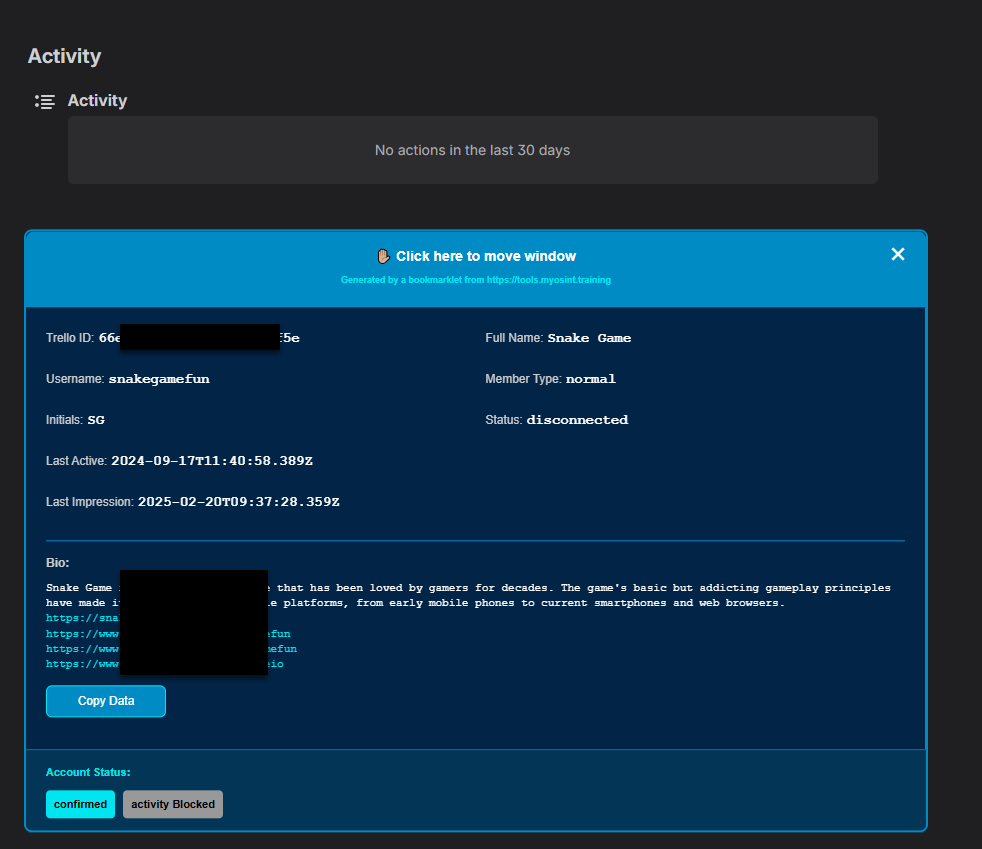
This new bookmarklet extracts hidden profile data from Trello user profiles. When viewing a profile at https://trello.com/u/username/activity, the bookmarklet fetches the underlying API data through an extra active API call and displays information not visible on the web interface.
Information including user ID, member type, account status, registration activity, and bio are displayed in a modal with date alerts for recent activity, account status badges, and clickable links within the bio section. All data can be easily copied to clipboard for further analysis or documentation.
Here is a redacted example where the top shows what you'd normally see on a profile and how the modal displays much more data.
Posted: 2026-01-12, by Micah Hoffman
We always strive to help you make great decisions about which of our bookmarklets are right for you to use. One factor might be the "does it make extra web calls to the web site or does it just use the data already in my browser?" issue.
To help you understand which bookmarklets are active and make additional calls versus passive and just using the data in your browser, we've added a new column to the https://tools.myosint.training website. Hope it helps!
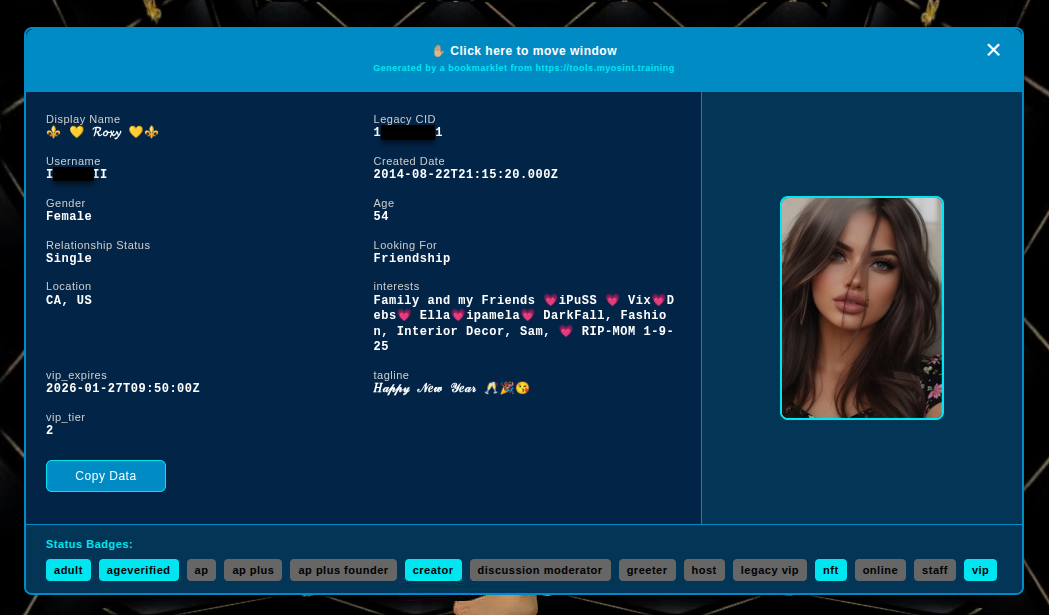
This new bookmarklet extracts hidden profile data from IMVU user profiles. When viewing a profile at https://www.imvu.com/next/av/USERNAME/, the bookmarklet fetches the underlying API data through an extra active API call and displays information not visible on the web interface—including precise ISO-formatted account creation and registration dates, Legacy CID (account identifier), relationship status, looking-for preferences, account flags (VIP, creator status, age verification, etc.), feature flags, online status, and the profile thumbnail image.
Here is a redacted example.
 IMVU User Bookmarklet
Posted: 2026-01-12, by Micah Hoffman
Our newest bookmarklet helps reveal data on the VK social media network. It works on most profiles with URLs like https://vk.com/idXXXXXXX.
This bookmarklet (in fact ALL our bookmarklets) is not a replacement for your OSINT analytic processes as this bookmarklet does not work on all pages and does not extract all the relevant data from the profile. You, the analyst, need to do that.
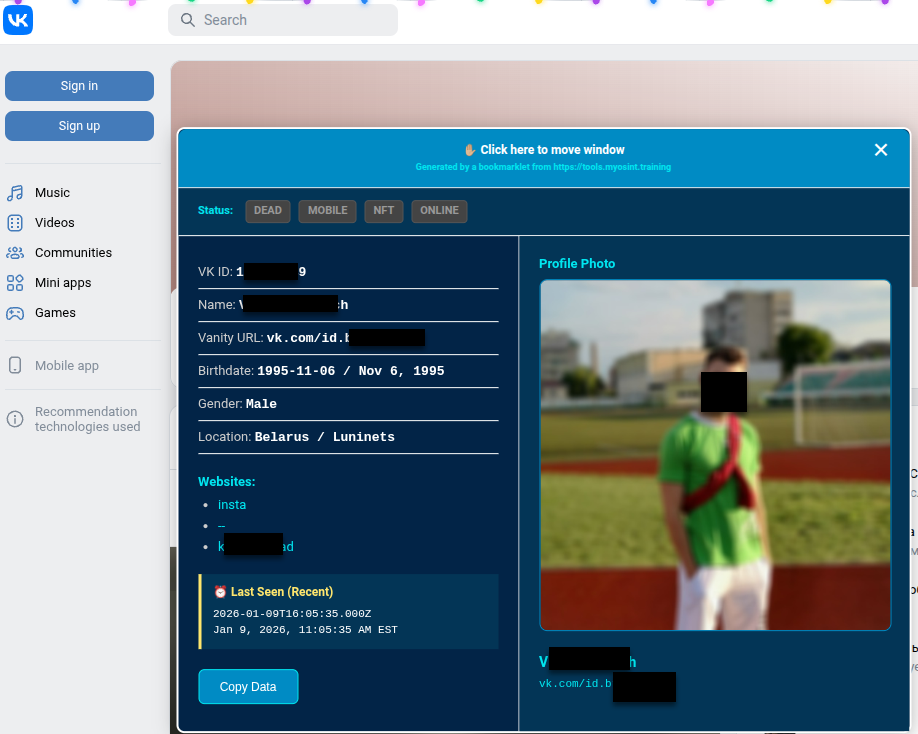
What it DOES do is extract and translate certain bits of data like maiden name and birthdate. It also makes accessing larger profile pictures easier.
Here is a redacted example of the bookmarklet's modal window in action.
 VK User Bookmarklet
Note the status badges at the top. They will "light up" if any of those flags are present in the page source.
Posted: 2026-01-07, by Micah Hoffman
Happy New Year wishes to everyone.
Our very own Anthony Lisek found some interesting data points in Flickr profile pages. His work led to the creation of the Flickr User Profile Bookmarklet.
This new bookmarklet extracts the account creation date/time, username, email, social media profiles, and more from profiles when your browser is on the https://www.flickr.com/people/username/ URL.
The bookmarklet also extracts the Unix timestamp from the profile photo and banner photo URLs (if present) and converts to human readable format.
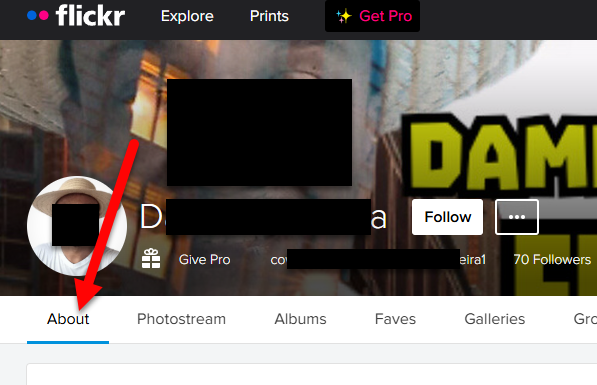
You need to click on the ABOUT link to get to the correct page for the bookmarklet to work. Here's a redacted image of where to click.
And here is the redacted image of our bookmarklet in action!
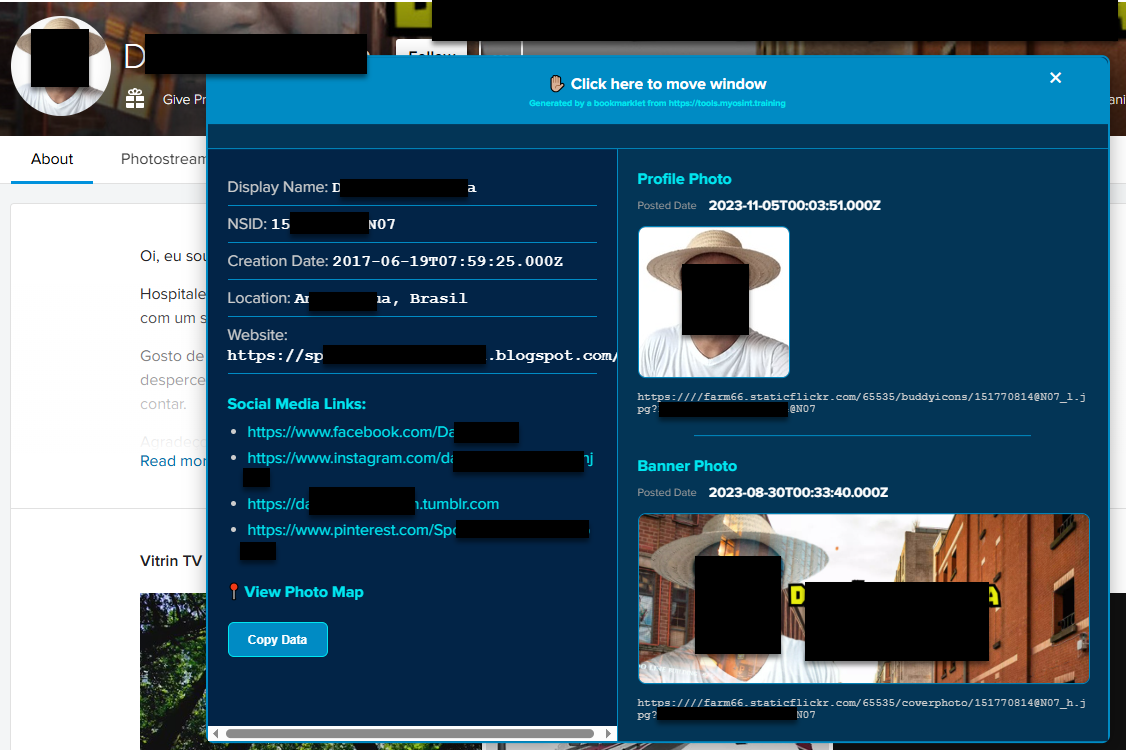 Flickr User Profile Bookmarklet
🚨 NOTE: You will need to reload the "ABOUT" web page once to get the data to load properly. 🚨
Posted: 2025-12-30, by Micah Hoffman
With 40 bookmarklets in our current https://tools.myosint.training page, installing them one-by-one in your browser and then organizing them is a lot of work.
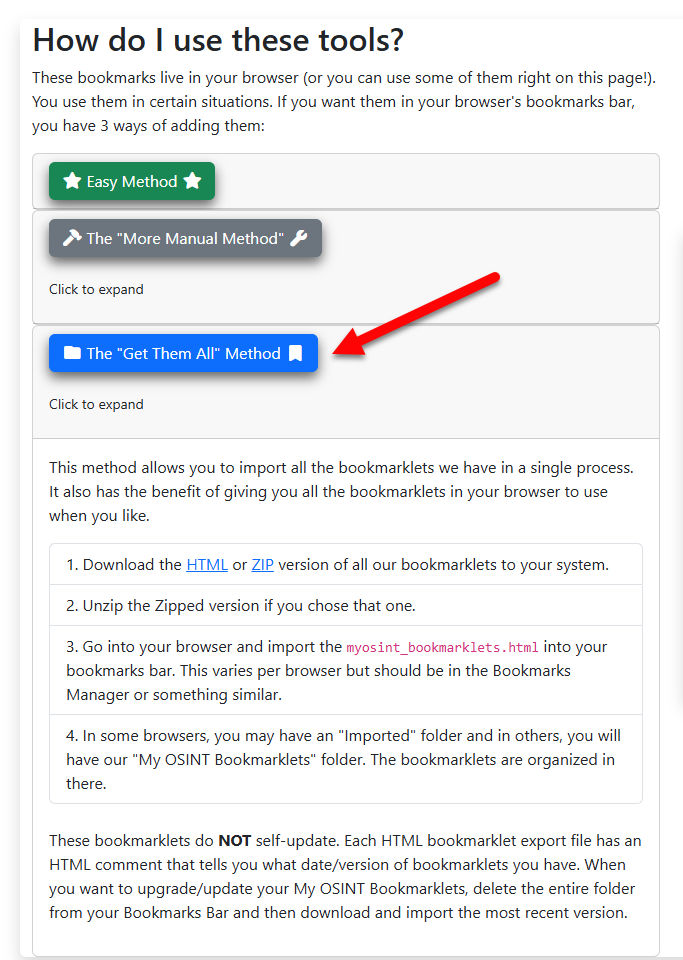
That is why we now release them individually AND as a bundle in an importable HTML file. Just use your Import Bookmarks feature of your favorite browser with the linked file above and you get them all.
If you visit the https://tools.myosint.training web page and scroll to the bottom, we've added a section that describes how to download and install these in your browser. It look like this:
These bookmarklets are organized by platform and purpose in a nested structure. Once imported, they look like this in your browser:
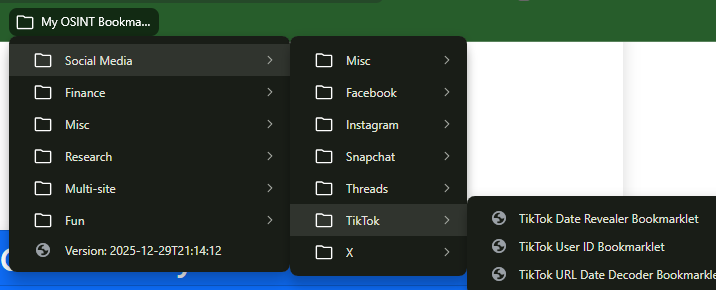
Notice in the screenshot just above this that there is a bookmark named "Version: 2025-12-29..."? That is when we generated that bookmark file. As we update our bookmarklets, you can see how old yours are and decide if you want to update them or not.
To update, just delete your imported bookmarks, get the newest file, and import into your browser! Simple.
Posted: 2025-12-29, by Micah Hoffman
On the heels of the release of the Instagram Comment Date Revealer that showed the absolute dates for comments inside a post, we are releasing the Instagram User Profile Post Date Revealer. (Whew...what a mouthful!)
This bookmarklet reveals the date/time stamps of posts on the user's Instagram profile page. Take a look at The Rock's page before and after using the bookmarklet.
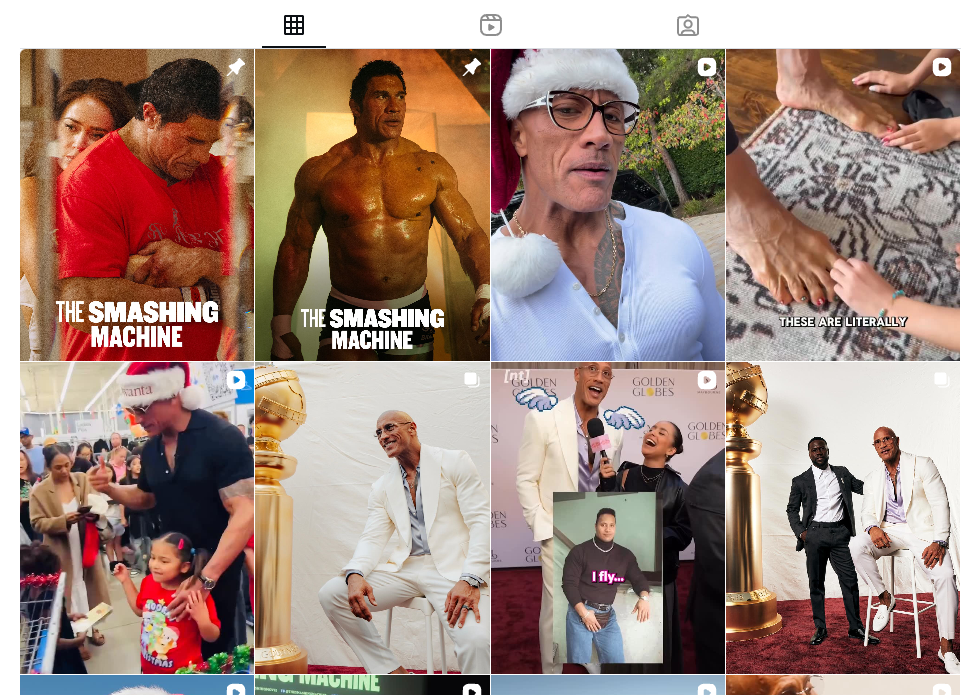 Before the Bookmarklet Use
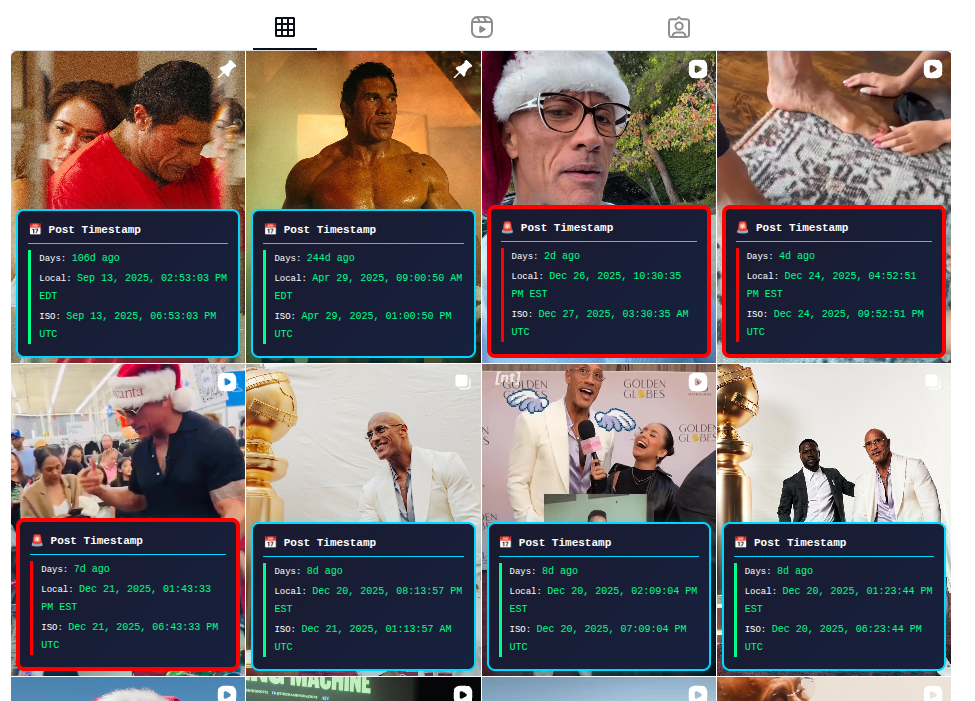 After Bookmarklet Use
Note the red boxes and the 🚨 reveal posts that were made within the past 7 days.
This should help you find those recent and/or relevant posts without clicking on every one of them.
(We also updated the TikTok Date Revealer Bookmarklet's look to match this one for consistency.)
Posted: 2025-12-23, by Micah Hoffman
Relative dates in our OSINT work can be useful but absolute dates are......absolutely better!
That is why we made the Instagram Date Revealer bookmarklet. Use it on posts, reels, and other pages where there are relative dates like "84w" (84 weeks ago) to reveal the exact date and time of the post in UTC and local time.
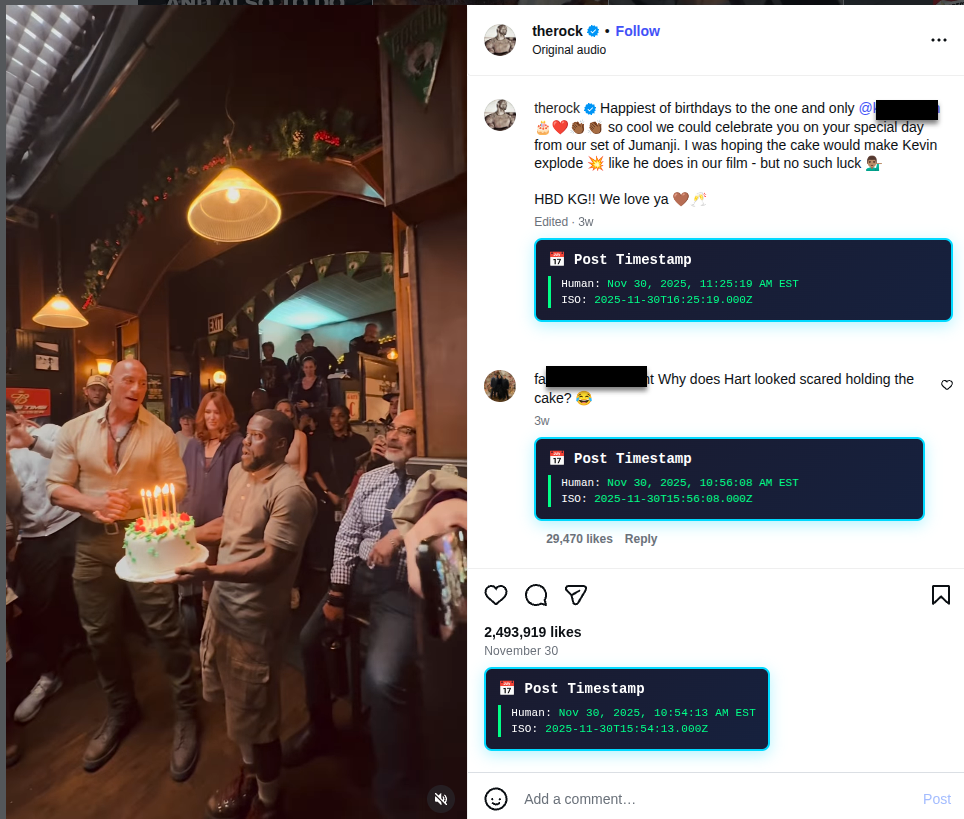 Instagram Date Revealer Image
Posted: 2025-12-19, by Micah Hoffman
Just released 3 new bookmarklet for your OSINT work.
Yoni posted in LinkedIn about a technique to reveal the absolute date of a Google Review in this post. If you don't know already, Google reviews show the relative dates like "Yesterday" or "4 weeks ago" when viewed.
But, Yoni showed that the data for the exact dates is in the web page. That is where our Google Review Date Revealer Bookmarklet comes into play. Go to an individual review page and use the bookmarklet and it will reveal the creation and maybe the modified dates of the review.
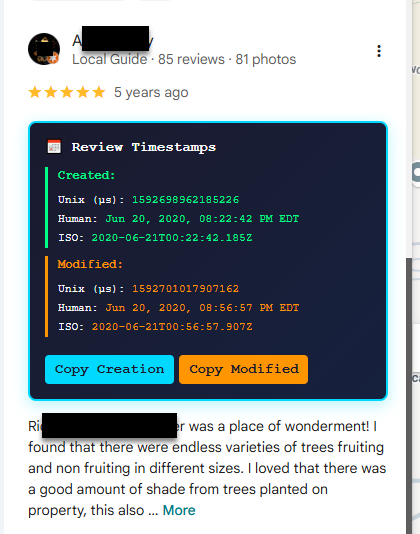 Google Review Date Revealer
I love working efficiently and, if your work ever has taken you to the https://linktr.ee web site, you know that our work of figuring out what the URLs are behind each hyperlink can get exhausting.
The Linktr.ee URL Revealer alters the web page to show the locations that the hyperlinks would take your browser to. Check out what happened on TheRock's Linktr.ee page when I ran it.
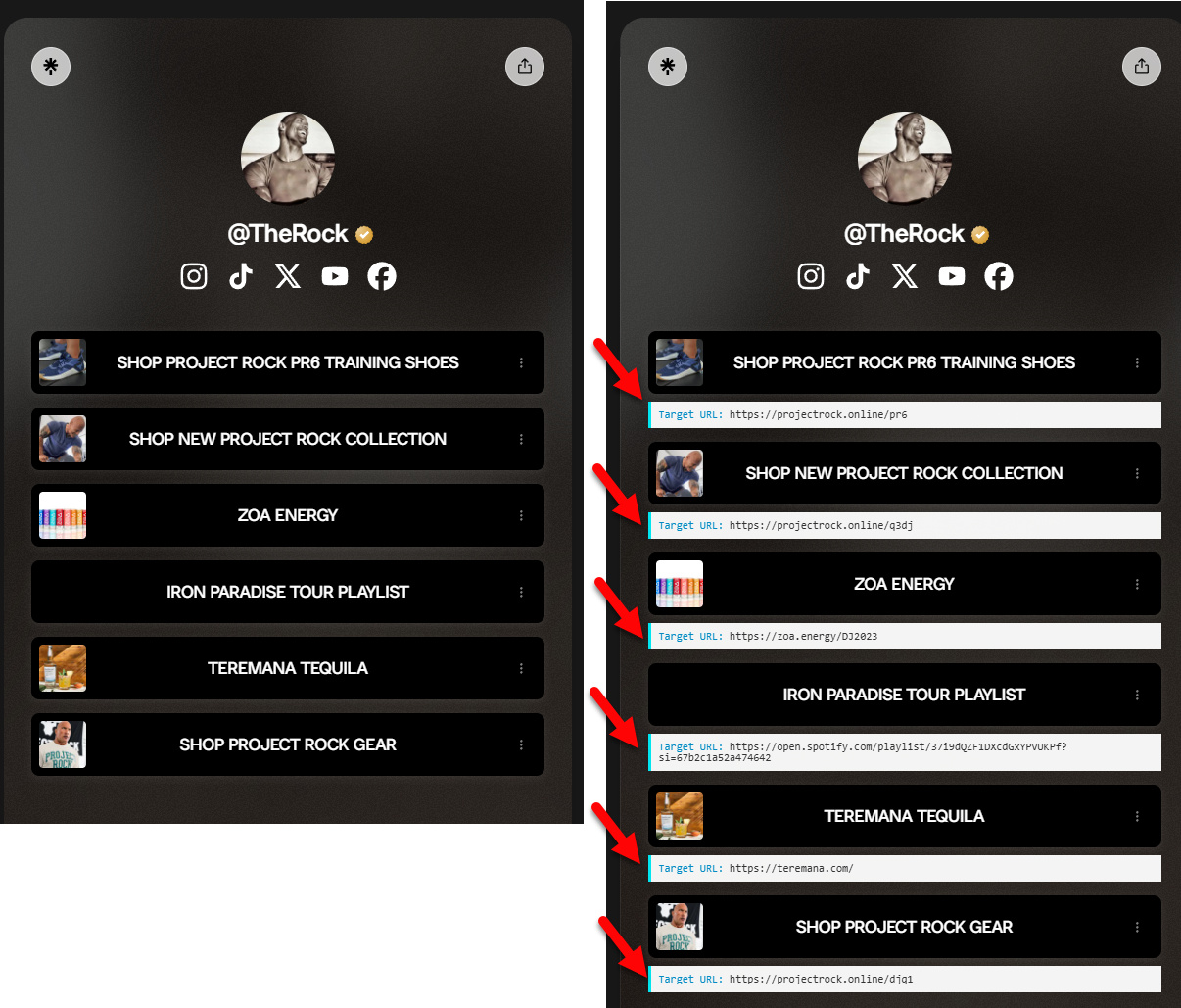 Linktree URL Revealer
We hope that this speeds up your review of these pages and helps you recognize important data points.
I was lucky enough to attend an Indicator.media workshop recently. In it, the amazing Craig Silverman showed how he used our Facebook Marketplace bookmarklet because, when using it, it could reveal the date when the Facebook account was created.
I can't tell you how much of an "A HA!" moment that was for me because I know that if I see it on the page, I may be able to get to it in the code and enhance the bookmarklet.
And that's what happened. The Facebook Marketplace Profile Bookmarklet now does 2 things:
Here is what it looks like when it works:
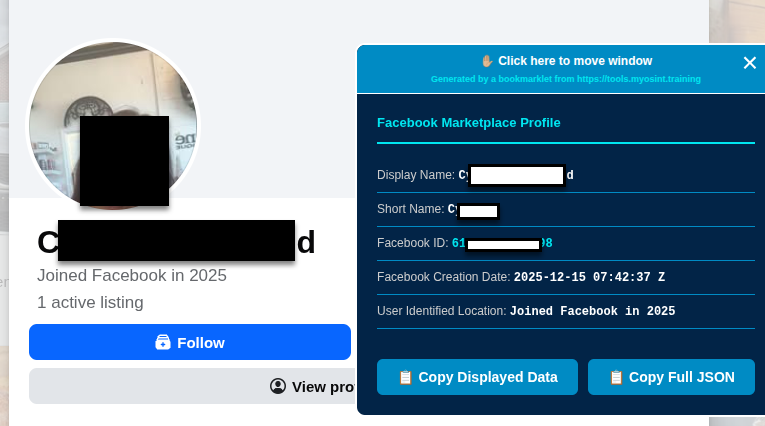 Facebook Marketplace Profile Bookmarklet
Of course things are not always straightforward in OSINT. Two issues may prevent this bookmarklet from working:
Hoping these bookmarklets make your OSINT lives MUCH easier and more fun!!
Posted: 2025-12-17, by Micah Hoffman
Effective immediately, we've made the hard decision to discontinue our Tampermonkey and Violentmonkey userscripts as we focus on providing better bookmarklet solutions for our users.
This decision was driven by two important considerations:
We will continue to build, manage, and expand our bookmarklets on the https://tools.myosint.training page. We are just changing how we deliver these bookmarklets to you.
We appreciate your understanding as we make this change to better serve you.
Posted: 2025-12-10, by Griffin Glynn
In late 2025, Google began rolling out stricter age-verification requirements across several of its products, including Gmail, YouTube, and Google Play. These updates were part of a broader compliance push tied to global digital-safety regulations and internal policy changes intended to prevent minors from accessing mature or sensitive AI features. Users with accounts that didn’t have a confirmed date of birth started receiving pop-up notices explaining that certain features could be limited until age verification was completed. While this rollout was primarily associated with YouTube and account-level safety controls, it has quietly affected Google Gemini as well.
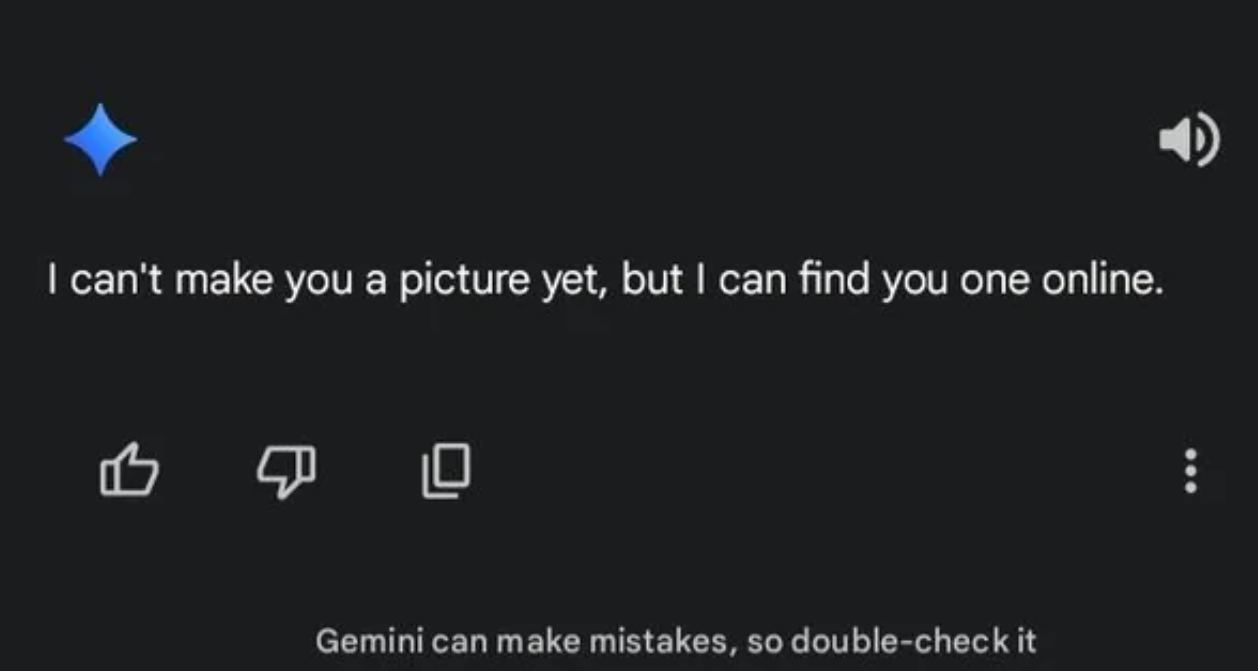
Where this becomes confusing is in how Gemini handles these restrictions. Unlike other Google services that provide explicit warnings, Gemini does not notify you that age verification is the reason a feature is blocked. Instead, users attempting to generate images often receive a vague error stating that Gemini “can't” create images or that the feature is unavailable. After testing and comparing cases, the most consistent cause of these failures is an unverified or ambiguously-verified Google account, especially for users who created new accounts solely for AI tools or who use pseudonymous “sock puppet” accounts.
To resolve the issue, Google now requires users to confirm their age through one of several verification methods. These options typically include uploading an identity document, completing a selfie video, or - less commonly discussed - using a third-party verification service that checks your provided email address. Many people prefer the email-based option because it doesn’t require sharing biometrics or documents, but it tends to succeed only for long-established accounts with consistent activity history. Recently created accounts, burner emails, or accounts built for anonymity often fail these checks because they lack the reputation or metadata needed for automated age-confidence scoring.
It’s also worth noting that Google’s age-verification system is increasingly tied to its Responsible AI policies, which classify image generation as a higher-risk capability. Because of this, Gemini may enforce stricter checks for image generation than for text-only interactions. In some cases, users have reported that even after verification attempts, the restriction remained until they logged out and back in, cleared session cookies, or re-synced their identity information across Google services - suggesting that the underlying enforcement is account-level but cached by session.
For users who rely on AI tools professionally or for research (such as OSINT practitioners), the key takeaway is this: if Gemini unexpectedly stops generating images, the most likely cause is not a bug but an account-trust issue, nearly always related to incomplete age verification. Ensuring that your primary Google account is age-verified - and avoiding newly created throwaway accounts for Gemini - will help maintain uninterrupted access to the tool.
Posted: 2025-12-08 (Updated 2025-12-22), by Micah Hoffman
A recent case had us researching Airbnb user profiles. This site uses URLs like https://www.airbnb.com/users/show/8675309 for user profiles. Some are accessible publicly, without authenticating to Airbnb, and some will redirect you to login.
In the source code of the page is a wealth of data related to the profile, its properties (if it is a host), and reviews of the person behind it. This bookmarklet reveals some of the additional data sent to your browser but not shown in the rendered web page.
Here is what a portion of a redacted profile shows in the browser:
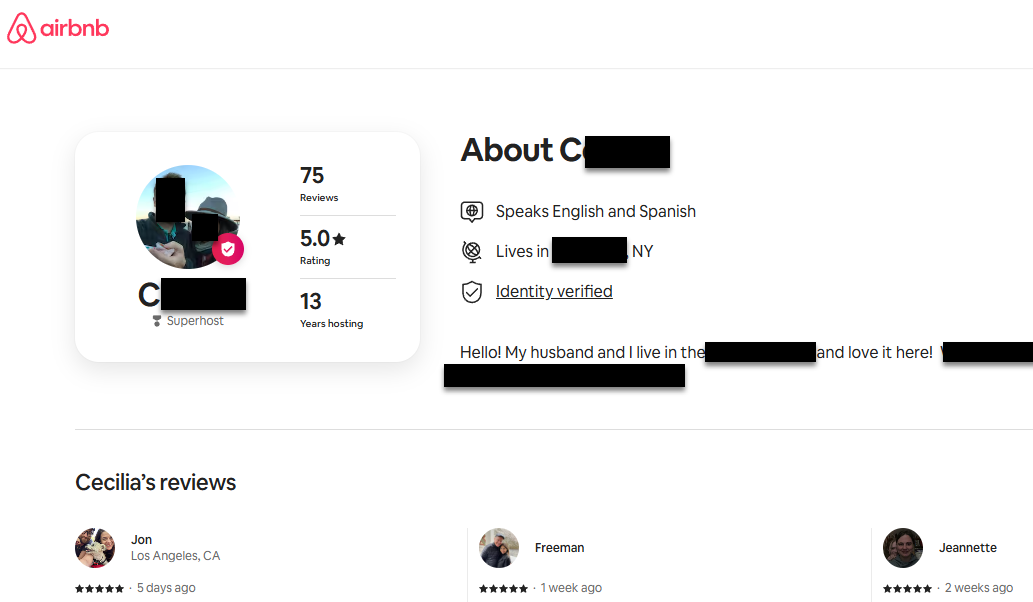 Example AirBnB Profile
Here is what our bookmarklet extracts:
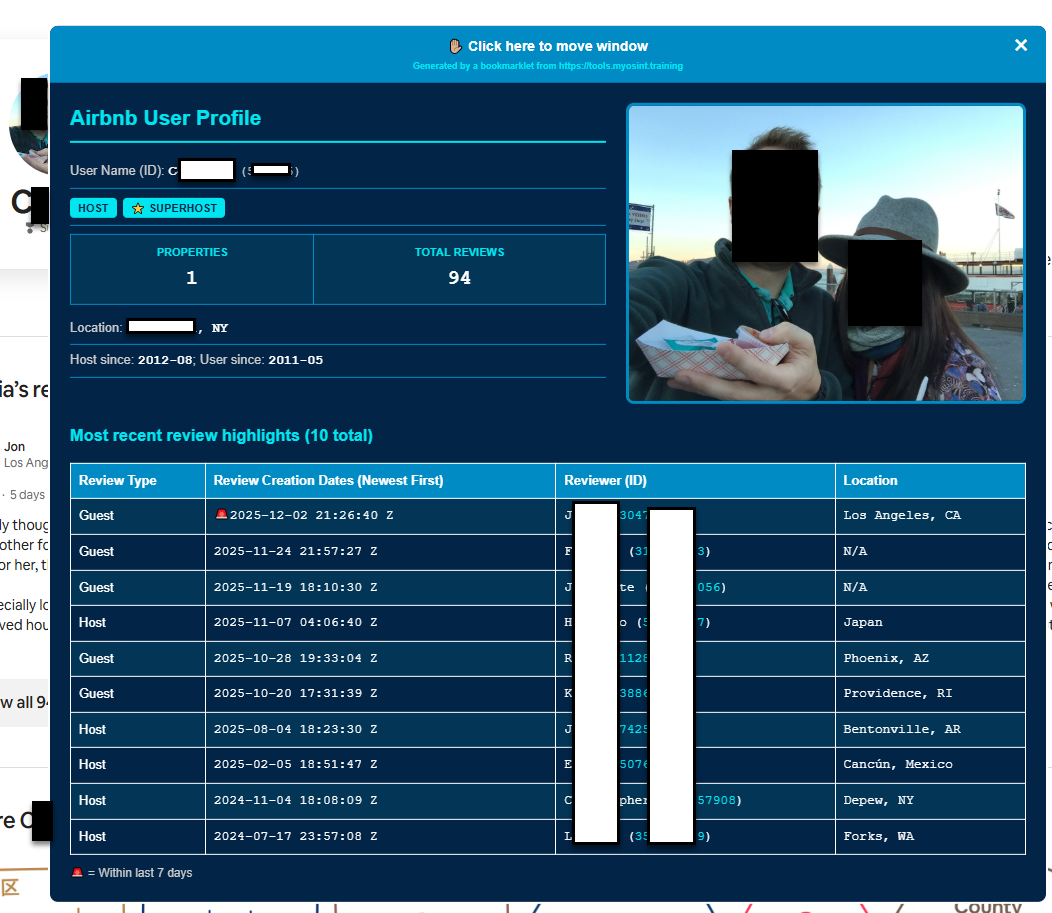 MOT's AirBnB User Bookmarklet Modal
Here are some of the details the bookmarklet extracts for you:
https://*.airbnb.*/users/show/12345 and https://*.airbnb.*/users/profile/123456789012345 formats.This bookmarklet works well for public profiles of hosts. It may not work well for guests that stay at host properties and users that have non-public profiles
Hope it is useful!
Posted: 2025-12-03, by Micah Hoffman
Our Cash App Profile Bookmarklet has always felt inefficient to me.
The way it used to work was that you visited a Cash App user profile and would execute the bookmarklet. A modal (pop-up) window showed some of the data. If there was a profile image, you would see a hyperlink to click to have it open in a new tab. So many clicks! Exhausting.
We chose to do it that way because the bookmarklet could not reach out to a new domain to get the image due to web browser protections called CSP.
So I went back to my proverbial drawing board and re-imagined a solution that is elegant and efficient! I paired a bookmarklet with an HTML web page hosted on our https://tools.myosint.training site. Here's how it works now:
So NOW you get the profile data AND image in a single web page. Here's an example:
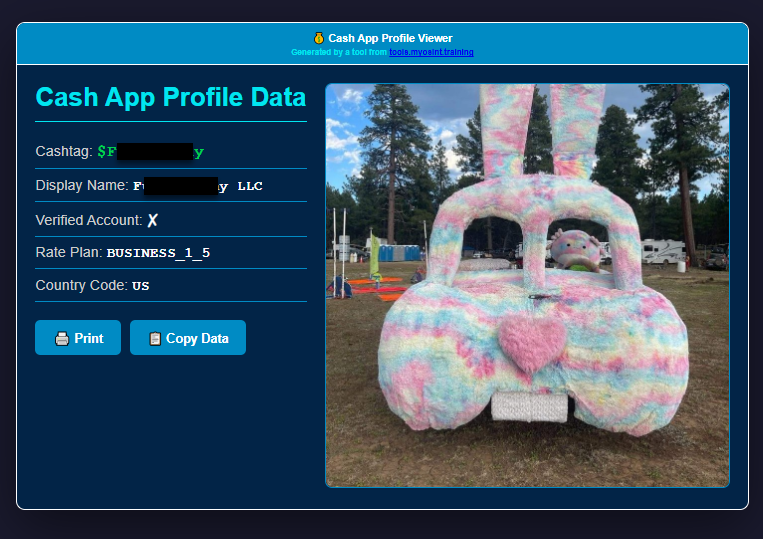 New Cash App Bookmarklet Output
The profile image is displayed and should be about 90-95% of the full sized image. Want to download it? Just right click and Save As.
We understand that some of you may have questions about the recent change from executing JavaScript bookmarklets in your browser to displaying data on our website. We want to be transparent about how this works.
When you use the Cash App bookmarklet, we simply take the data you've scraped and display it for you. We don't store, record, or log any of this information. Your OSINT work remains private—we're focused on building tools, not tracking how you use them.
The Cash App bookmarklet executes JavaScript in your browser, then displays the results on a web page on our site. This allows you to view the data along with a rendering of the profile image (if one exists).
We completely respect that different users have different comfort levels with various approaches. If this setup doesn't work for you, you're welcome to continue using other methods or tools that better fit your needs.
Posted: 2025-11-26, by Micah Hoffman
Just updated our X User ID Bookmarklet to include the location-based data (3 in the image below) that X recently revealed. To get this data, our bookmarklet needs to make and additional request to X on your behalf...so we've noted this is now an "Offensive" bookmarklet.
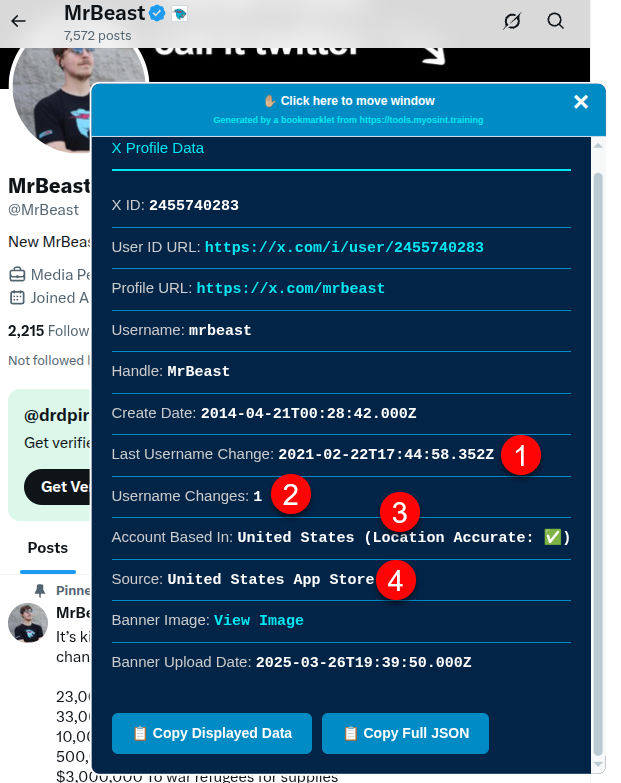 X.com User ID Bookmarklet
One other cool thing we put in is the last name change date of the account (1 in the image above) and how many times the account has been renamed (2).
Finally, we have the source of the account (4), which appears to be where the account was made and the "location accurate" parameter which your guess is as good as mine as to what that means.
Enjoy!
Posted: 2025-11-24, by Micah Hoffman
Quick note to tell you that we've made some big revisions in how many of our bookmarklets display data.
Each bookmarklet that changes the content of the page (👀 looking at you Date Revealer bookmarklets!) now gets a little message on the bottom right of the page stating that the bookmarklet has altered the page. We hope this makes it a little more clear to you and others that might see your screenshots. 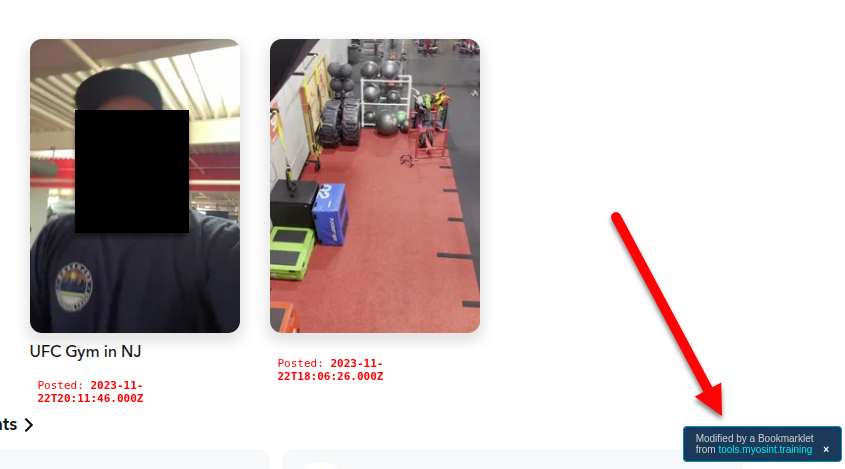
I bet a few of you have been frustrated by some of the bookmarklets that have content you want to copy. You click the modal and it moves. So frustrating....but not any more!
Our bookmarklets that pop up a modal window now have a header or banner that you can click on to move the modal. Any other place you click will do normal "mouse things" (like selecting text).
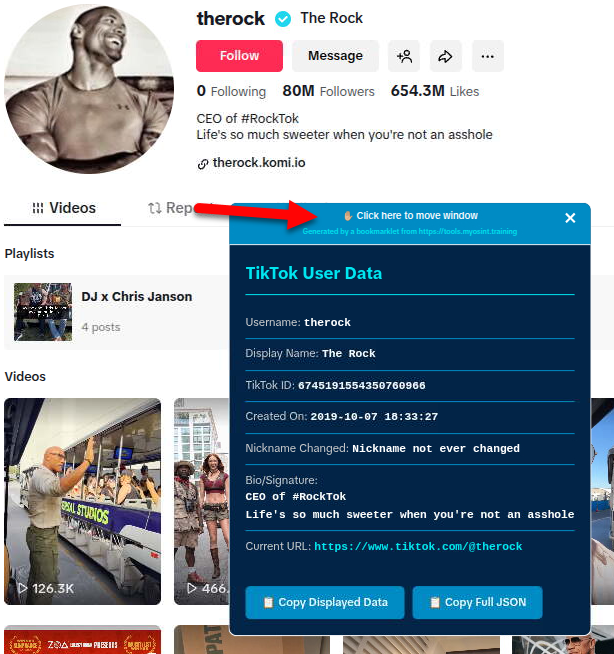
At the bottom of the modal windows you will now find a button to copy the data in the window as human-readable text and one to copy it in JSON. Hopefully this makes it even easier for you to save the data.
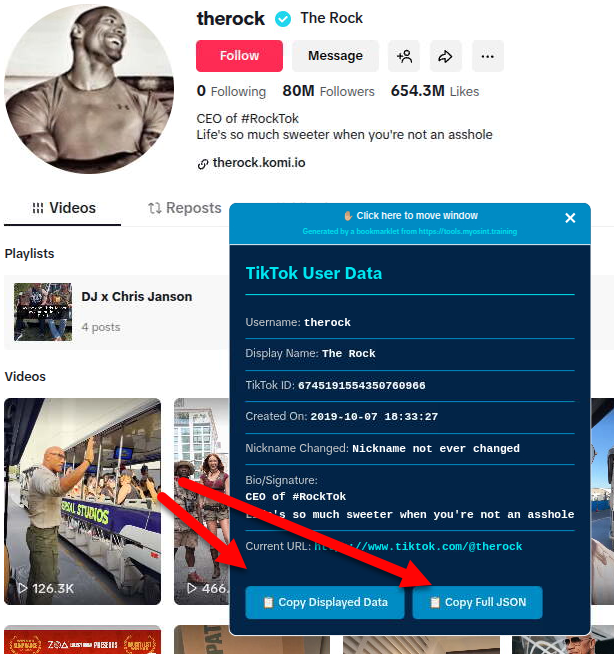
We are now using a standard-looking modal for our output. This means it should be easy for you to see it and find the data you need. You can see the blue modals in the above images.
The X Banner Bookmarklet that showed the date and time the banner image for an X profile was uploaded has been combined with our X User ID Bookmarklet.
We added a little bit of text to the modals, noting that the text was extracted with a bookmarklet from the https://tools.myosint.training site.
We hope this helps to spread awareness of these free tools and helps you and your colleagues remember "How did you get this data? What tool makes this modal window?"
We hope these changes make your use of these bookmarklets even easier and make your OSINT investigations that much more fun to do!
Posted: 2025-11-21, by Micah Hoffman
This bookmarklet is used on TikTok user profile pages. It adds the date and time to each video or reposted video on the page and reveals the image alt tag data as well so you can easily see the dates without clicking each video.
If the dates are within 7 days of the current date, you will see a 🚨 on the front of the timestamp to alert you to recent activity!
To remove the timestamps, refresh the page.
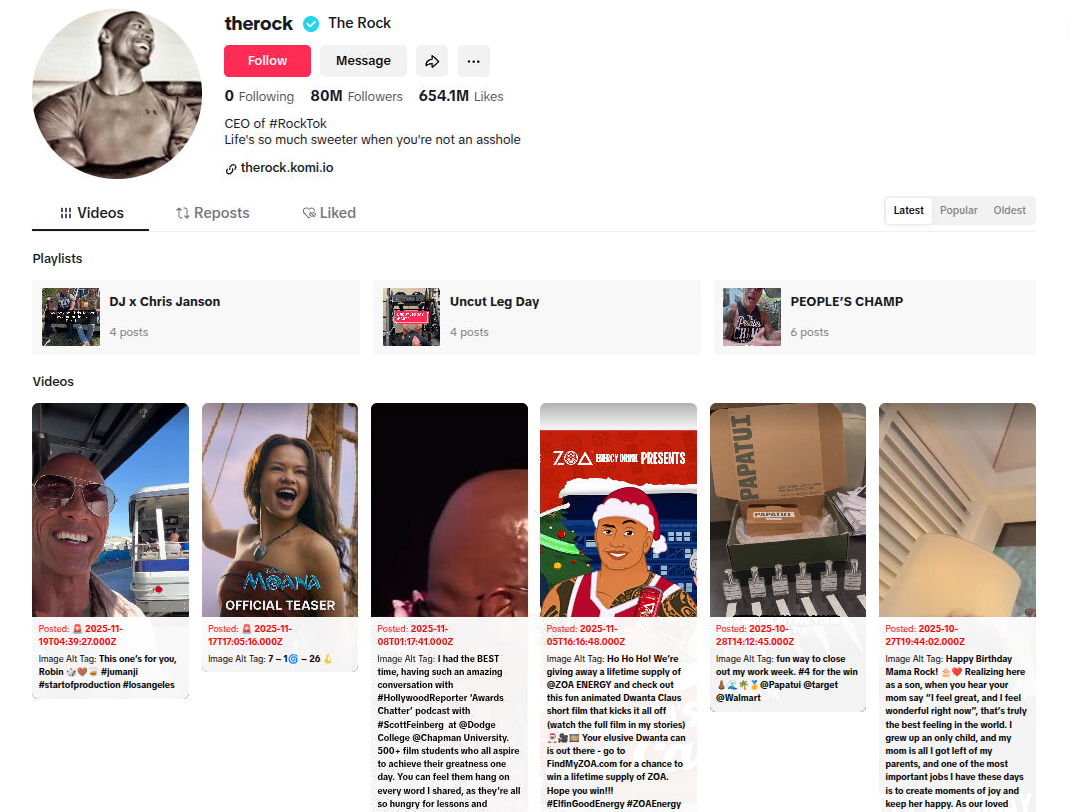 TikTok Date Revealer Bookmarklet
Posted: 2025-11-21, by Micah Hoffman
We have wanted to create a blog for quite some time now and, while specific page is temporary until we get our production one set up, it is at least a place for us to share some more OSINT with you!
As our bookmarklet library grows and these tools do more and more in your browser, we feel it is important to be clear about their use.
To this end, our Tools page now has a Disclaimers section at the bottom that you should read before using the bookmarklets.
We've been busy making new bookmarklets that you can get on our Tools page. These tools go WAY beyond just showing user IDs on social media platforms. You are going to ♥ the capabilities they put in your hands!
This bookmarklet is used on Pinterest user profile pages. The extracts user data and then grabs dates and times for 10 "boards". It then displays a modal with the user data and a table to display most recent board modifications. It also copies the data to your computer's clipboard for easy pasting into your notes.
This not only helps the OSINT analyst see creation and last used dates/times of the user account but also which boards were updated when.
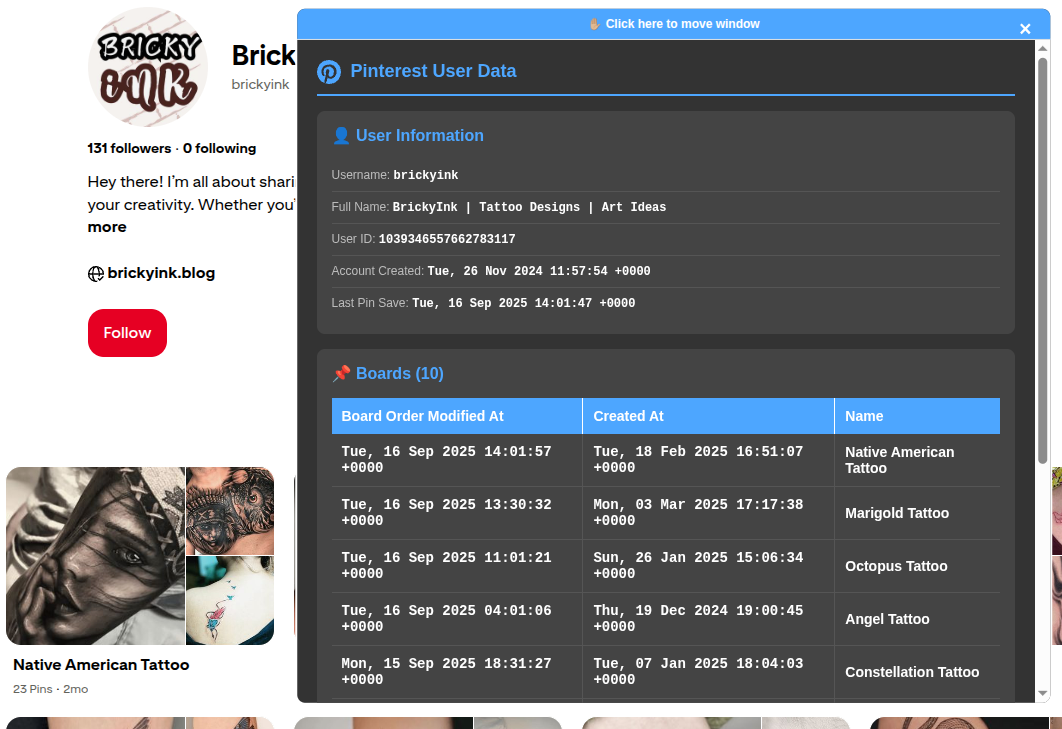 Pinterest User Bookmarklet
👤 Poshmark User Bookmarklet
This bookmarklet is used on Poshmark user profile pages. It extracts user data and displays in a modal window.
The Poshmark web application pushes a lot of user information to your browser. This bookmarklet reveals that data to you in a scroll-able modal window.
It also has buttons at the bottom of the modal window to copy the data to your computer's clipboard for easy pasting into your notes.
Some interesting pieces of data you might find in Poshmark profiles using this bookmarklet include:
There is so much data in the page that we decided to just show it all to you and let YOU decide what is and is not important.
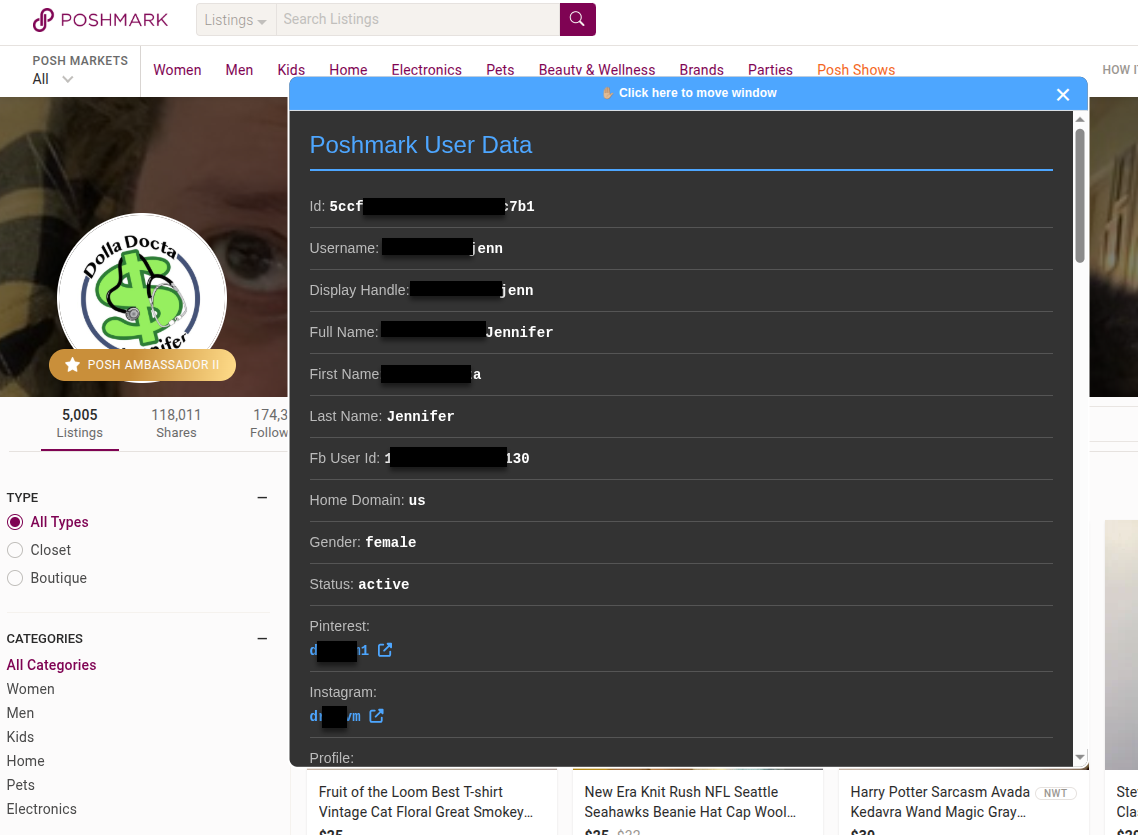 Poshmark User Bookmarklet
📅 Poshmark Date Revealer Bookmarklet
This bookmarklet is used on Poshmark user profile pages.
The purpose is the alter the listings and add the dates when they were most recently changed. These dates and times are in the source code of the web page but don't show in the listing display.
By showing the updated dates and times, analysts can hone in on listings and activity that are relevant to their investigations. Simply visit a Poshmark user page (like the one previously mentioned) and activate the bookmarklet to show the dates and times in red at the bottom of each listing.
To remove the timestamps, refresh the page.
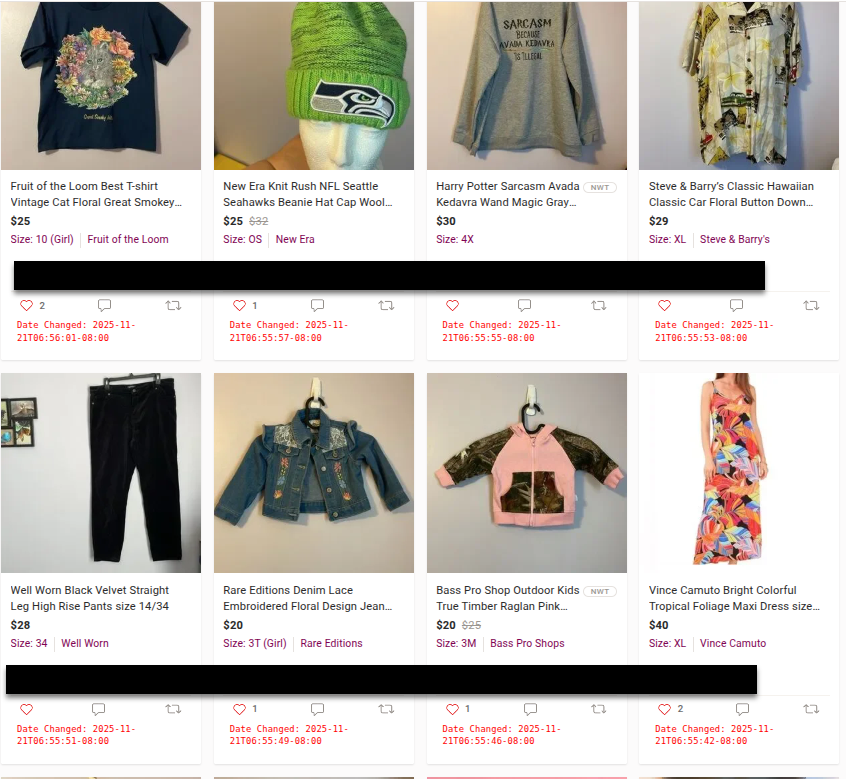 Poshmark Date Revealer Bookmarklet
This bookmarklet is used on Snapchat user profile pages. This script adds the date and time to each story or spotlight video on the page so you can easily see the dates without clicking each video.
If the dates are within 7 days of the current date, you will see a 🚨 on the front of the timestamp to alert you to recent activity!
To remove the timestamps, refresh the page.
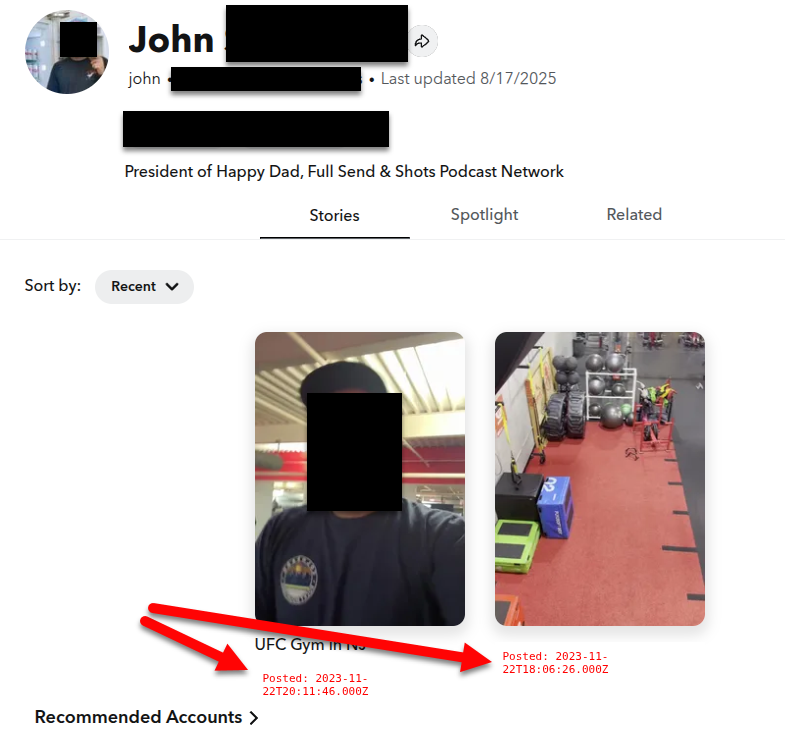 Snapchat Story/Spotlight Timestamp Bookmarklet
This bookmarklet extracts the creation and last updated dates from a Soundcloud profile page.
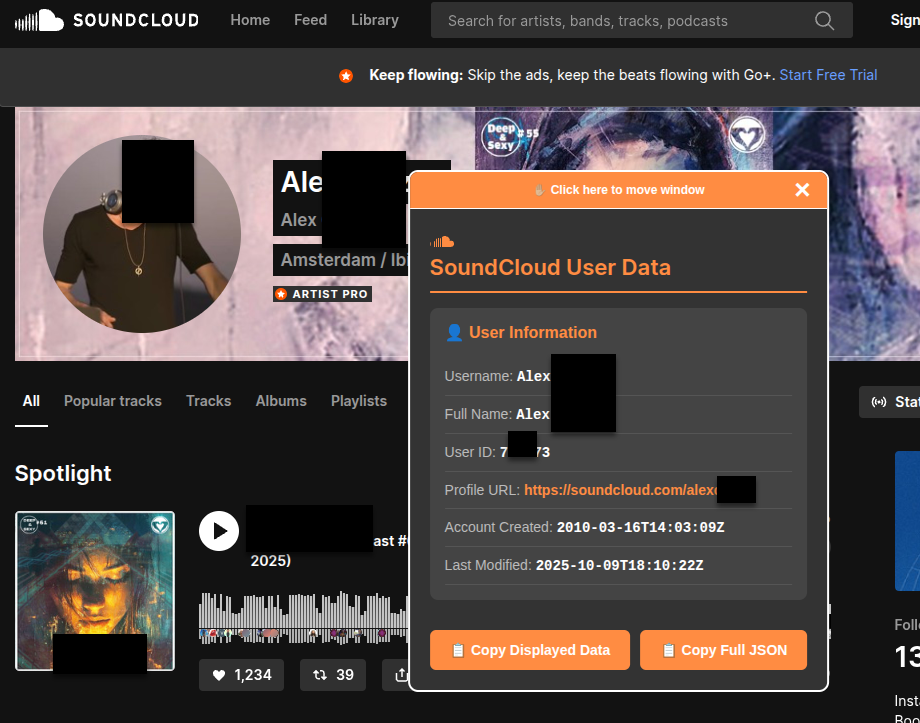 Soundcloud User Bookmarklet
We've got a lot more ideas for OSINT bookmarklets to make your work easier so stay tuned, watch our LinkedIn, BlueSky, and X socials and stay OSINT Curious!
--- Micah